

Updated July 26th, 2026.
Here’s the 2026 NBA Playoffs Schedule for iPhone and Mac, hand-made* by me. It’s updated as the schedule is announced. The events show up in your regular Calendar app so you don’t have to go to a website for the schedule and then waste time switching back and forth with your regular calendar. Have it all in one place. Fast and easy.
UPDATE 4/13/2026: I have the Play-In Tournament schedule up now.
Hopefully the NBA will produce their excellent Game Recaps as they have in years past. If they do, I’ll add links to them in the description after the game. For example, if you double-click on Warriors-Kings Game 1 (images here are from 2023– sorry, I’m updating as quickly as I can) in the calendar, you’ll get this:

Click the link and you get a really nice video. This is a great way to catch up on the games. You can even click a button to make the video slow-motion. Super-cool.
This NBA Playoffs Calendar also works with Google Calendar. If you’re using Google Calendar, not Apple’s Calendar (for macOS or iOS or iPadOS), then copy this link, go to calendars.google.com in a browser, add a calendar “from URL” and paste in the link.
Did I mention that the game times adjust automatically, depending on your time zone? Of course they do. Did I mention that the TV channels are included? Of course the TV channels are included. (They’re in each game’s title, so you don’t even have to tap to see the details). I also include the location of the game, if you need it, and a link to my email in case you find a mistake (or want to say hello).
Click to subscribe to the NBA Playoffs Calendar.
On the Mac, it looks like this in Month View (click to see the larger version):
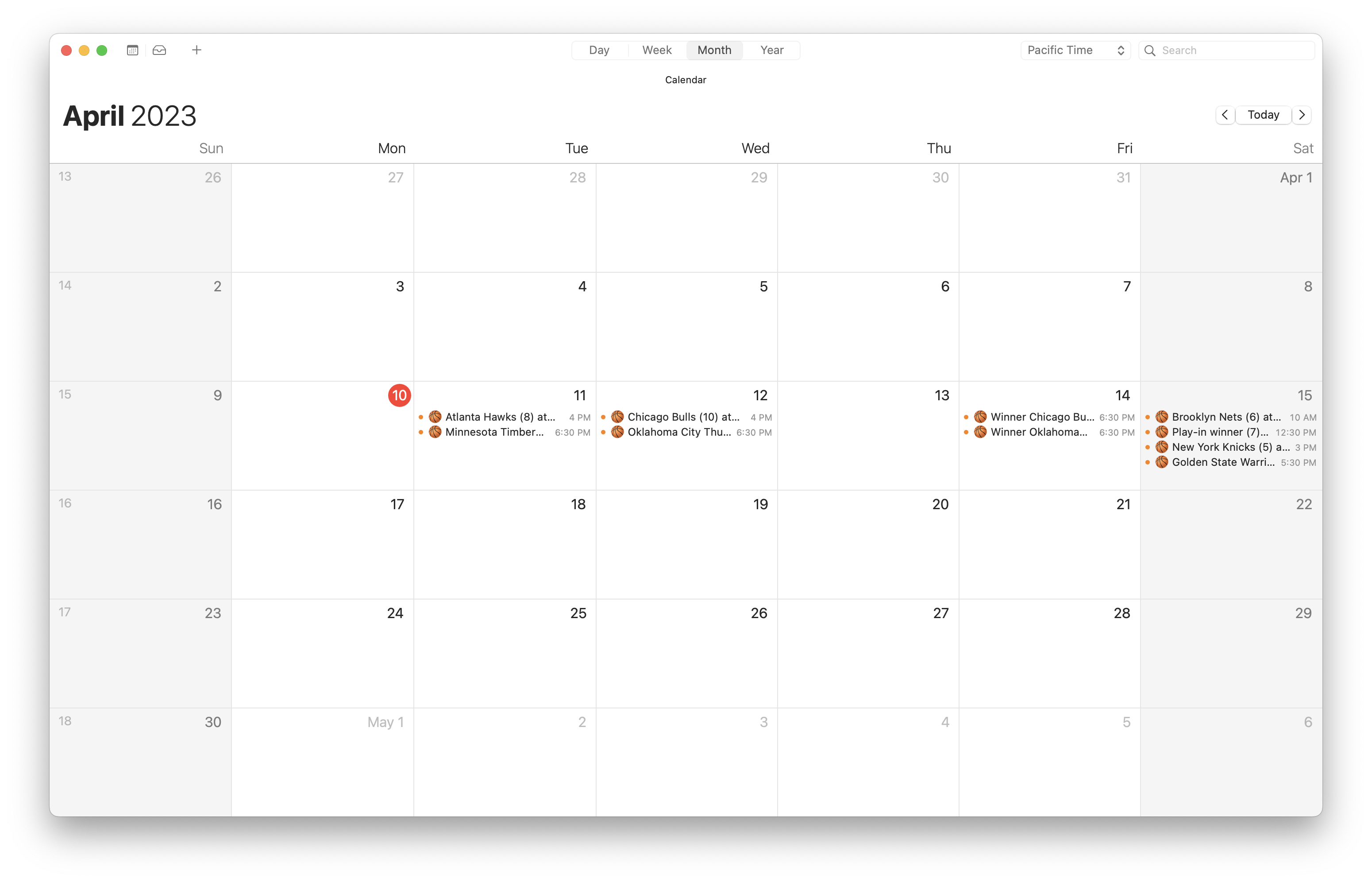
In Week View, it looks like this (click to see the larger version):

On an iPhone, it looks like this:

The little basketballs in front of each event help you quickly spot the NBA Playoff games, even in a busy calendar. Here’s how it looks with some of my other calendars turned on:

In case you wondered, I also maintain the March Madness Calendar for iPhone and Mac— all games, updated as the games are played– and the College Football Bowl Games Calendar for iPhone and Mac. If you’re looking for the NFL Prime-Time games calendar, I have an article (and a calendar) for that too.
NOTE: I kept thinking I’d find a calendar like this online somewhere– nba.com, ESPN.com, cbssports.com– but I never did! I finally gave up and made it myself.
Going forward, if you subscribe to the calendar, you’ll see the games appear as if by magic, and if I get some good feedback (HINT: share this on Facebook or Twitter or anywhere else) I will do it again next year! And, when I do, YOU won’t have to do anything. You’ll just see the games miraculously appear in your Calendar app again next April (or whenever the playoffs start). It’s a lot of work for me so do me a favor and give me that sharing feedback. THANK YOU!
How to subscribe on your Mac
On your Mac, if you click the link for the NBA Playoffs Calendar for iPhone and Mac you will get a box like this:

Clicking “Allow” leads to this box:

Clicking the “Subscribe” button leads to this dialog box:

You can pick the color for the events, you can choose to remove alerts and attachments, and you can set the auto-refresh frequency. I would set it to “Every day” as shown. And that’s all there is to it.
TIP: you can change these options at any time by Control-clicking on the name of the calendar (NBA Playoffs) in the list of calendars at the left of your Mac’s Calendar app’s window. Choose “Get Info” from the menu that appears.
TIP #2: you can unsubscribe at any time (also by Control-clicking). Choose “Unsubscribe” if you want.
BONUS TIP: if you subscribe to the NBA Playoffs Calendar for iPhone and Mac on your Mac, and you choose “iCloud” in the Location option, you will find the calendar shows up on your iPhone automatically. Nothing more to do! It does not work the other way around– that is, if you start on the Mac, it carries over to your iPhone, but if you start on your iPhone, it does NOT carry over to the Mac. This is Apple’s bug.
How to subscribe on your iPhone
On your iPhone, if you tap the link for the NBA Playoffs Calendar for iPhone and Mac, you’ll see a little box asking you whether you want to subscribe to the calendar “NBA Playoffs.” Of course you do.


If you change your mind, you can go to Settings, Calendars, Accounts, and then scroll way down to “Subscribed Calendars.” Tap on that, then on the NBA Playoffs calendar, and then Delete Account. Can’t see why you’d do that but you can if you want. These instructions are for iOS 16.
NOTE: you are ADDING A CALENDAR to your list of calendars, not adding events to your existing calendars. The added calendar will be called “NBA Playoffs.” You can uncheck the box next to the NBA Calendar in your list of calendars (on your Mac) or uncheck the check mark next to the NBA Playoff calendar (on your iOS device) to hide those events.
One More Thing: you can add these calendars to your Google Calendar too. Remember: copy this link, then go to calendars.google.com, add a calendar “From URL” and paste the link in.
*Technically I did not make the calendar purely by hand. That would be crazy. Instead, I scavenged the web for the information I needed, then (with help from ChatGPT) I put that info into a Numbers table, one table per series. I set up the tables with columns for home team, away team, game time, game date, TV channel, arena, score, and game number, one row per game. I wrote an AppleScript to create Calendar events based on the text in those Numbers tables, making good use of Shane Stanley’s CalendarLib script library (because using AppleScript with Calendar’s built-in AppleScript dictionary is slow, and also because I needed practice with CalendarLib).
Copyright 2008-2024 Christian Boyce. All rights reserved.Did this article help you?
Maybe you'd like to contribute to theChristian Boyce coffee fund.

Want some some quick iPhone how-tos?
Visit me at iPhoneinaminute.com.
Looking for quick tips about Macs?
See my One-Minute Macman website!

This is really cool but it says that the connection is not secure and then “Cannot Subscribe”, even after allowing. Thoughts?
Using Apple’s Calendar app on the Mac? Google calendar in a browser? Get me some details.
Same here. Error (-1) on Calendar for Mac. Can’t subscribe.
Give me some details and I’ll see what I can do to make this work for you.
It used to work but around a few days ago the calendar stopped updating. Now I noticed you have a new link posted on May 29. I deleted the old calendar and tried the new link. It doesn’t work. A new calendar is added to my calendar list but it has an “exclamation mark’ on it. Clicking on it pop up an error message box: “Your calendar couldn’t be refreshed. There was an unexpected error with the request (domain CalCalendarStorePersistenceErrorDomain / error 1550).”
I hope to get it working as it was very useful, thank you!
Derek, sorry for the trouble. I think there’s something wrong with the iCloud synching. I think it’s Apple’s issue. Here is another link to try (the original link):
webcal://p36-caldav.icloud.com/published/2/MTk1NjM3MzIxOTU2MzczMnzAzYgaN6qApV8Y-QiFRnO7RjN6FLAlvT_yW0UHC3wzQ-7Xui3gAN1WdtgCME8ZO5VPSa2O7ttrKyrdSZpv3Fs
Let me know how it goes. I am trying to track down the cause of the issue so I can figure out a fix (if it’s my problem to fix!).
Hi thanks so much for this…been experiencing some of the problems mentioned above, but seems to be working now. It’s crazy that the NBA doesn’t do this themselves!
BTW thought I’d highlight – the Jazz/Grizzlies game today and coming up both appear as 15 minute appointments, unlike all the other games.
Refresh the calendar and see what happens. It ought to show a 2.5 hour duration for every game (except for the ones that are “TBA”– those are in there, but show as “all day”).
No idea why, but just the Jazz/Grizzlies games still show up as 15 minute events. Although when I actually look at the details, the start/end times are correct, i.e. 2.5 hours apart.
I tried the original link as suggested by you. Same result but the error code is slightly different: “There was an unexpected error with the request (domain NSCocoaErrorDomain / error 1560).”
no longer working :/
I had to export the calendar and then import it into a new calendar– there was corruption in the old one. Here is the new link. The links in the article have been updated also.
webcal://p36-caldav.icloud.com/published/2/MTk1NjM3MzIxOTU2MzczMnzAzYgaN6qApV8Y-QiFRnMqgVI7w3Ys-2wfLBkzYgeSR-DHTPy4_EMFGQeXQtRO1duo5WjuXJbkfkT6vdvkywQ
AWESOME!!! We are back!
This one works perfectly, thanks Christian!
I noticed the old link stopped working but this one is back better than ever… thank you!
Yes, there was corruption somewhere along the way. The odd thing is, all of my own devices kept in sync. This is an iCloud calendar, and I’m guessing that “sharing” it with the public happens differently than sharing it among the five or six devices that I use (with the same iCloud account). Anyway, I’m glad you found the new link. Tell a friend!
Hi there, just wanted to double check to see if this NBA playoffs calendar is still updating properly? It was fine just as of a day or two ago. I know it can take some time for an update to reach me but this now seems inordinately long. Playoff games that have already ended still show as all day events with no specific time in the calendar.
Perhaps it’s just my instance but all my other calendars appear to be working just fine. Thanks in advance for checking!
Hi Rex– I am updating at least daily (the NBA is not quick to update their site, so I check often). I sometimes can get updates quicker from EPSN.com than I can from nba.com. Crazy! At the moment, we are up to date all the way through this Friday, June 18th. The only “All day” events in our calendar are those for Saturday and Sunday, as their times have not been set. Let me know how you are viewing the calendar– iPhone? Mac?– and whether you are “refreshing” to bring in new stuff.
HI Christian, I just found your NBA playoff calendar to subscribe to…I LOVE the idea!!!
Unfortunately the only calendar I am able to subscribe to is the “OLD ONE, please delete”.
The most recent one in this thread says error unable to subscribe. I’m on a 2012 MacBook Pro running macOS Catalina ver 10.15.7. I’d really like to be able to subscribe. =)
There seems to be something wrong with iCloud’s server on this. I’ve run into the issue twice lately. So, I’ve changed the calendar hosting to google. Try this link: webcal://calendar.google.com/calendar/ical/elraeed981m8qp0vic08i39oss%40group.calendar.google.com/public/basic.ics
I’ve changed all the links in the article to be this new Google link. Let me know how it goes.
Hi there, I definitely do not want to take anything for granted but I’m subscribed to your NBA Playoffs calendar and wanted to inquire if you are going to continue with them for the upcoming 2022 Playoffs? I sure hope you are but either way, I’ve appreciated using them in the past so thank you for that!
Yes, I’m doing it right now! I see the NBA released the schedule on Thursday night so I will get this up online in a few minutes.
And now… it’s up! Also, there’s a Google Calendar version down at the bottom of the blog post. Give that a whirl if you need it.
Tried out the Google Calendar version and it’s working great, thank you!
Fantastic. I’ll be updating as information becomes available.
Tell a friend!
Hi there, are you continuing with the NBA calendar for 2023?
Yes I am! Waiting for today’s games to complete so we know who’s in the Play-in games. Should have that updated tonight. If you subscribed last year the games should magically appear tonight.
Can’t get link to work for Google Calendar for the 2023 Playoffs. Please help!
Do it in a browser first. Then you will see it other places.
My mistake. Do it like this: copy this link, then go to calendars.google.com, add a calendar “From URL” and paste the link in. Let me know how it goes.
Thank you for doing this. Very cool.
You’re welcome! Glad you like it. Just added the games that the NBA announced today, for the conference semi-finals. More to come!
This is awesome!
BTW. I’m using the new feature in ios 16.5 with homepod to let my homepod told me about upcoming game!
Quick question will you release all nba games; summer league? pre season? regular season ? Thanks!
You must be quite the NBA fan, wanting a calendar with all of those games on your iPhone. I don’t plan on doing any NBA calendars beyond the NBA Playoffs, but… if I had a good source of data, that didn’t take too much work to clean up, I might think about it. Might.
This is awesome ! 1000 thanks, and the attention to the extra details (the seed number of each team) is perfect. Cheers
You’re welcome. Tell a friend! Meanwhile… if you open up an event after the game’s been played, you will find a link to the game summary video, from nba.com. These are great videos, very well done, and they post them fairly quickly. I add the links, along with the score, as soon as I can.
Rad, except for the fact it spoils the game if you haven’t seen it yet
I think you bring up a good point. I am thinking of NOT adding the scores (although I think the link to the game recap is still nice).
I could put the score in the description, so you wouldn’t see it unless you worked at it.
NHL? Please !
I did it: https://christianboyce.com/nhl-playoff-schedule-for-iphone-ipad-and-mac-calendar-apps/